The model router playbook for small teams: When and how to fall back to local inference
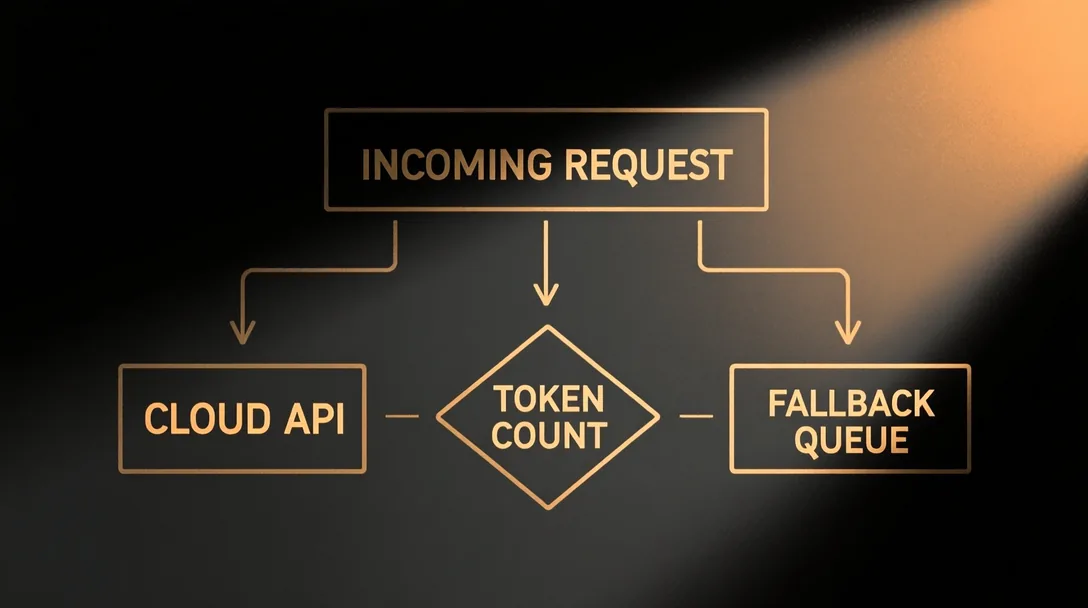
Most small teams don't need to choose between cloud and local. They need a router that chooses for them.
The false dichotomy goes like this: either you send everything to OpenAI and Anthropic and accept the bill, the latency, and the data leaving your network, or you buy GPUs, hire an MLOps person, and pray your 70B model fits in VRAM. Both extremes are wrong for a team of three to ten engineers shipping a product.
The right answer is a routing layer that sends each request to the cheapest adequate model, cloud or local, based on criteria you define once and adjust as models and prices change. This post is a playbook for building that router. Read it and build it yourself, or hand the whole article to your coding agent and let it do the work while you review.
What a router actually decides
A production router evaluates three variables on every request:
- Capability floor. Does the task need reasoning, tool use, or context length that only a frontier model delivers?
- Latency budget. Is this a user-facing chat turn (sub-2-second target) or a background batch job (minutes are fine)?
- Data gravity. Does the prompt contain anything that can't leave your own network: customer personal information, source code, health records, or regulated data?
Everything else is a tiebreaker: cost per token, current queue depth, model freshness.
Which way does the fallback go?
Both, and getting this straight up front saves confusion later. The router's real default is per request: it sends each one to the cheapest model that can do the job, cloud or local. "Fallback" is just what happens when the first choice can't take a request, and it runs in two directions depending on why.
Fall back to local when the data can't leave your network (the hard rule a couple of sections down), when you'd rather stop paying per token for work a local model handles fine, or when your cloud provider is down or throttling you. If you send everything to the cloud today, this is the direction you'll lean on most, and it's the one the title names.
Fall back to cloud when a request needs more than your local models can give, a frontier tier you don't run, or a spike above your local capacity, or when your own box is down. Here the cloud is burst capacity and a capability ceiling you rent only when you reach for it.
So the table below lists a cloud option for every tier, not because cloud is the destination, but because it's the other end of a two-way street. Keep the direction in mind as you read: the triggers differ, and so do the models you would pick.
The capability floor: a concrete taxonomy
Don't vibe-check this. Map your actual workloads to a tier list you can defend in a PR review.
| Tier | Representative models (as of August 2026) | Typical local hardware (as of August 2026) | Cloud option |
|---|---|---|---|
| T1: Classification, extraction, formatting | Qwen3.6 4B, Gemma 4 4B, Qwen3.6 1.7B | An M-series Mac with 16 to 32 GB (an older MacBook Air or Mac mini), or any 8 GB+ GPU | Gemini 3.6 Flash, Claude Haiku 4.5, Gemini 3.5 Flash-Lite |
| T2: Structured reasoning, multi-step tool use, 32k to 256k context | Qwen3.6 27B dense, Qwen3.6 35B-A3B (MoE) | NVIDIA DGX Spark (128 GB unified), Ryzen AI Max+ 395 (128 GB), Mac Studio M5 (up to 128 GB) | GPT-5.2, Claude Sonnet 5, Gemini 3.1 Pro |
| T3: Frontier reasoning, 1M+ context, novel tool synthesis | Frontier is cloud at these sizes; the largest practical local open weights top out around 405B on a cluster | 2×DGX Spark cluster (up to ~405B), otherwise cloud | GPT-5.2, Claude Opus 4.8, Gemini 3.1 Pro, or open weights served (GLM-5.2, Kimi K3) |
If your workload lives in T1, you can run it locally on hardware you probably already own. A 4B model in a good quant fits an M-series Mac with 16 to 32 GB, an older MacBook Air or a cheap Mac mini handles these comfortably, no dedicated GPU box required. T2 is where the hardware bill used to get real, though a single 128 GB unified-memory box, a DGX Spark, a Ryzen AI Max+, or an M5 Mac, now covers most of it. T3 is mostly cloud for now, and that's fine, because T3 requests are rare and high-value. The one shift worth planning around: the biggest open-weight models, GLM-5.2 and Kimi K3, are now strong enough that a cheap cloud endpoint serving open weights is often the right T3 fallback, at a fraction of a closed frontier model's price.
Latency budgets that match product reality
Measure your actual product, not a benchmark harness. Every job has a different tolerance for waiting, and the router needs to know which is which.
- Interactive chat. Someone is watching the cursor. You want the first words on screen in under two seconds, then a steady stream fast enough to read along with. Local T1 models on an M-series Mac hit this. Cloud T1 models (Gemini 3.6 Flash, Claude Haiku 4.5) hit it too, as long as you're in the same region and the provider isn't throttling you.
- Background enrichment. Nobody is watching the screen; the job runs behind the scenes. A minute from start to finish is fine. Local T2 on a DGX Spark or a Ryzen AI Max+ box is comfortable here, and cloud T2 is comfortable too, often cheaper per token if you send the work in batches.
- Human-in-the-loop review. A person reads the output before anything happens with it, so speed barely matters. Route to the cheapest adequate model and let it take its time.
Write these targets down. If you haven't decided up front how fast each kind of request needs to be, the router has nothing to aim at, and it will optimize for the wrong thing.
Data gravity: the non-negotiable branch
Some data is too sensitive to leave your own network, whatever a cloud model could do with it. That pull, the reason certain requests have to stay in-house, is what data gravity means, and in the router it beats every other rule.
This branch is all-or-nothing. If a prompt contains customer PII (personally identifiable information: the names, emails, and account numbers that point to a real person), or unreleased source code, or health records, or anything your compliance person flagged, that request never touches an outside service like OpenAI or Anthropic. No exceptions, not even when a vendor has signed a contract promising to handle regulated data for you.
Enforce it with a check that runs before the router ever sees the request. It doesn't need to be clever: a hundred lines that scan the text for telltale patterns (a Social Security number and an email address each have a shape you can match), backed by spaCy, a free open-source tool that pulls names, places, and organizations out of plain text, for the cases a raw pattern misses. When the check trips, tag the request local-only, and the router's job is done for you: sensitive work goes to a model on your own hardware, and nowhere else.
A router you can ship this week
Don't build a framework. Wire together three components:
- Model registry. A YAML file (or SQLite table) listing every model you run or call: name, tier, endpoint, max context, input/output price per 1M tokens, local GPU requirement, health-check endpoint.
- Policy engine. A pure function
route(request, registry) -> model_idthat encodes your tier/latency/data rules. No ML, no learning, just if/else you can unit-test. - Execution layer. LiteLLM, Ollama's OpenAI-compatible endpoint, or a thin wrapper around
httpx+transformers. The policy engine returns a model ID; the execution layer knows how to call it.
Here's the policy engine skeleton in Python. Copy, extend, test:
from dataclasses import dataclass
from enum import Enum

class Tier(Enum):
    T1 = 1
    T2 = 2
    T3 = 3

class DataClass(Enum):
    PUBLIC = "public"
    INTERNAL = "internal"
    RESTRICTED = "restricted"

@dataclass
class ModelSpec:
    id: str
    tier: Tier
    endpoint: str          # "local://qwen3.6-4b" or "google://gemini-3.6-flash"
    max_context: int
    price_in_per_1m: float
    price_out_per_1m: float
    local_gpu_vram_gb: int | None = None
    health_endpoint: str | None = None

@dataclass
class RouteRequest:
    tier_required: Tier
    latency_budget_ms: int
    data_class: DataClass
    estimated_input_tokens: int
    estimated_output_tokens: int

def route(req: RouteRequest, registry: list[ModelSpec]) -> str:
    # Hard constraint: restricted data never leaves the building.
    # Build the safe pool once, and never widen it again.
    if req.data_class == DataClass.RESTRICTED:
        pool = [m for m in registry if m.endpoint.startswith("local://")]
        if not pool:
            raise RuntimeError("No local model available for restricted data")
    else:
        pool = list(registry)

    # Capability floor
    pool = [m for m in pool if m.tier.value >= req.tier_required.value]
    if not pool:
        raise RuntimeError(f"No model meets tier {req.tier_required}")

    # Latency heuristic: local ~50 ms/token, cloud ~100 ms/token plus network
    def est_latency(m: ModelSpec) -> int:
        per_token = 50 if m.endpoint.startswith("local://") else 100
        base = 50 if m.endpoint.startswith("local://") else 150
        return base + req.estimated_output_tokens * per_token

    candidates = [m for m in pool if est_latency(m) <= req.latency_budget_ms]
    if not candidates:
        # Relax latency once, but keep the tier and data-gravity constraints
        candidates = pool

    # Tiebreaker: cheapest estimated cost
    def est_cost(m: ModelSpec) -> float:
        return (req.estimated_input_tokens * m.price_in_per_1m +
                req.estimated_output_tokens * m.price_out_per_1m) / 1_000_000

    return min(candidates, key=est_cost).id
That's the whole policy engine. Note the one rule it never bends: once restricted data narrows the pool to local models, nothing later, not a latency relaxation, not the cost tiebreaker, is allowed to widen it again. The rest is wiring.
What the registry looks like in practice
A real registry for a team running one 5090 box and calling a couple of cloud providers:
models:
  - id: qwen3.6-4b
    tier: T1
    endpoint: "local://qwen3.6-4b"
    max_context: 262144
    price_in_per_1m: 0.0
    price_out_per_1m: 0.0
    local_gpu_vram_gb: 6
    health_endpoint: "http://gpu-box:11434/api/tags"

  - id: qwen3.6-27b
    tier: T2
    endpoint: "local://qwen3.6-27b"
    max_context: 262144
    price_in_per_1m: 0.0
    price_out_per_1m: 0.0
    local_gpu_vram_gb: 20
    health_endpoint: "http://gpu-box:11434/api/tags"

  - id: gemini-3.5-flash-lite
    tier: T1
    endpoint: "google://gemini-3.5-flash-lite"
    max_context: 1048576
    price_in_per_1m: 0.30
    price_out_per_1m: 2.50

  - id: claude-haiku-4.5
    tier: T1
    endpoint: "anthropic://claude-haiku-4.5"
    max_context: 200000
    price_in_per_1m: 1.00
    price_out_per_1m: 5.00

  - id: glm-5.2
    tier: T2
    endpoint: "openrouter://glm-5.2"   # open weights, served
    max_context: 1048576
    price_in_per_1m: 0.82
    price_out_per_1m: 2.59

  - id: gemini-3.1-pro
    tier: T2
    endpoint: "google://gemini-3.1-pro"
    max_context: 1048576
    price_in_per_1m: 2.00
    price_out_per_1m: 12.00

  - id: claude-sonnet-5
    tier: T2
    endpoint: "anthropic://claude-sonnet-5"
    max_context: 200000
    price_in_per_1m: 3.00
    price_out_per_1m: 15.00
Representative prices as of August 2026. Note GLM-5.2, an open-weight model served in the cloud, undercuts the closed T2 models by a wide margin, which is exactly the kind of arbitrage the registry exists to exploit. Verify each price on the provider's own page before you rely on it, they change often.
Health checks and fallback chains
Your router will call a dead endpoint. Plan for it.
- Every local model exposes
/health(Ollama:/api/tags, vLLM:/health, TGI:/health). Poll every 30 s. - Every cloud provider returns 429/503/504. Implement exponential backoff with jitter, then fail over to the next-cheapest model in the same tier.
- Log every fallback with
request_id, primary_model, fallback_model, reason, latency_ms. Review weekly.
If you're falling back to cloud T2 more than 5% of T1 requests, your local capacity is undersized or your tier classification is wrong.
Cost accounting that doesn't lie
Local isn't free. Amortize the hardware.
- M-series Mac mini (16 GB): ~$599. 3-year life, 50% utilization = about $0.05/hour, and it runs any T1 model. This is the cheap entry point, and often a machine you already have.
- RTX 5090 (32 GB): ~$2,000 MSRP, though street prices run higher. At 50% utilization, 3-year life, about $0.15/GPU-hour.
- 2×H100 80 GB (cloud spot): ~$2.50/GPU-hour each on Lambda, RunPod, or CoreWeave.
- NVIDIA DGX Spark (128 GB unified): ~$4,699. 3-year life, 50% utilization = about $0.36/hour, and its 128 GB holds models and long-context workloads that overflow a 32 GB card, up to 70B-class and beyond.
Add electricity (about $0.12/kWh typical US commercial), cooling, and rack space if you're not in a closet. A Mac mini all-in is around $0.06/hr; a dedicated 5090 box is closer to $0.23/hr. Pick the denominator that matches the box the workload actually needs, T1 does not need the 5090.
Compare: 1M output tokens from Qwen3.6 4B on a Mac mini at ~40 tok/s = about 7 hours = ~$0.40 fully loaded. A cheap cloud T1 model like Gemini 3.5 Flash-Lite runs about $2.50 for the same million output tokens. The local box wins outright on marginal cost for T1, on hardware you likely already own, and once it is a sunk cost the marginal cost is electricity only, pennies for that 1M tokens.
The router should know both numbers: marginal cloud cost vs. marginal local cost (electricity) vs. fully-loaded local cost (amortized hardware). Use the right one for the decision you're making.
One caveat on every number in this section: hardware and token prices move fast, and they move differently for each vendor. Treat these as a snapshot, not a quote. Look up the current prices yourself before you build a budget on them.
What breaks this playbook
- You have no GPU access. Rent spot H100s by the hour and treat them as "local" in the registry. The policy engine doesn't care who owns the metal.
- Your workload is 95% T3. You're a cloud shop. The router still matters for the 5%, route those to local T1/T2 and save the frontier calls for where they earn their keep.
- You need model customization (LoRA, DPO, continued pretraining). That is not a routing problem. Training runs on its own pipeline, and the router only ever picks among models that are already serving. Once your fine-tuned model is deployed behind an endpoint, it becomes one more entry in the registry the router can select, but the training itself lives outside this system.
- Your team won't maintain a YAML file. Put the registry in a shared Postgres table with a tiny admin UI. The policy engine stays pure.
The metric that tells you it's working
Track cloud spend per 1K user-facing requests month over month. A functioning router drives this down without degrading your T2/T3 success rate (measured by your eval suite, not vibes).
If cloud spend is flat but local GPU utilization is under 20%, your tier classifier is too conservative, promote more workloads to T1 local. If local utilization is 90% and fallback rate is climbing, buy or rent more GPU.
The router is a lever. The metric tells you which way to pull.
More from the blog →